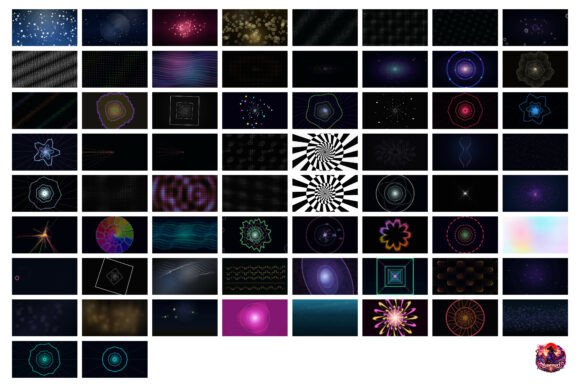
Kawaii Stream Overlay Backgrounds
If you’ve ever spent three days tweaking a single animated backdrop—only to realize it still doesn’t match your client’s VTuber persona—you know how quickly “polished debut” turns into “postponed launch.” Kawaii Stream Overlay Backgrounds solves that exact bottleneck: not by replacing your creative judgment, but by removing the rendering grind so you can invest time where it matters most—rigging, branding alignment, and audience engagement strategy.
What You’re Actually Getting (No Guesswork)
This isn’t a collection of static PNGs or low-res loops. It’s 109 purpose-built MP4 clips—each rendered at true 4K resolution (3840 × 2160 px)—designed from the ground up for live-stream workflows. Every file is encoded with H.264 compression for broad compatibility and smooth playback in OBS Studio, Streamlabs Desktop, Adobe Premiere Pro, and DaVinci Resolve. No plugins, no conversion steps, no frame-dropping during peak alert moments.
The library covers four practical categories:
- Animated overlays and borders — subtle parallax sakura falls, floating kawaii icons, soft gradient pulses — all loop seamlessly without visible restart points.
- BRB and Starting-Soon screens — gentle motion that holds attention without distraction, with built-in safe zones for text placement (no cropping on mobile or console viewers).
- Alert transitions — short, expressive 1–2 second cues (think confetti bursts, chibi character winks, or pixel-style “ding” animations) that sync cleanly with Twitch or YouTube’s native alert triggers.
- VTuber debut backgrounds — full-scene video backdrops with layered depth: foreground sparkles, midground character silhouettes, and soft-focus background gradients — all optimized to keep focus on your talent’s rig without visual competition.
Why Resolution and Format Matter More Than You Think
Many creators assume “HD” is enough—until they scale a stream to dual monitors or embed footage in a YouTube recap video. At 4K, these backgrounds retain crisp detail even when cropped or repositioned in post-production. That flexibility becomes critical when repurposing content: a BRB screen used during a live stream can double as an intro sequence in an edited highlight reel, with zero quality loss.
MP4 delivery also avoids common pipeline friction. Unlike MOV files (which sometimes trigger alpha-channel mismatches in OBS), or WEBM (which lacks consistent hardware acceleration), these MP4s load reliably across devices and OS versions. One designer reported cutting setup time from 45 minutes to under 90 seconds per scene — simply drag, drop, adjust scale, and go.
Who Benefits Most — And Why Timing Is Everything
This set shines brightest for professionals managing multiple creator clients — especially those launching VTubers or anime-adjacent brands. Consider a freelance stream designer juggling three debuts in one month. Without Kawaii Stream Overlay Backgrounds, each project demands custom After Effects timelines, render farm time, and iterative feedback loops around motion timing and color harmony. With it, they allocate those same 12–15 hours toward refining lip-sync responsiveness, optimizing lighting rigs for green-screen consistency, or A/B testing overlay transparency levels against real viewer retention data.
It’s equally valuable for educators building interactive anime-themed learning streams (e.g., Japanese language tutorials or digital art workshops), where visual cohesion reinforces pedagogy. One university instructor used the “floating notebook” background during live coding demos — the gentle page-turn animation subtly reinforced her lesson theme without pulling focus from syntax explanations.
Realistic Fit Considerations
Kawaii Stream Overlay Backgrounds isn’t meant for hyper-realistic or cinematic horror streams — its aesthetic leans intentionally into playful, upbeat, stylized charm. If your client’s brand centers on gritty cyberpunk or minimalist monochrome design, these assets won’t align. Similarly, while all clips are loopable, they’re not modular: you can’t swap individual layers (e.g., remove stars but keep clouds). That’s by design — it preserves the cohesive look that makes them instantly recognizable as part of a unified visual language.
Also note: these are background elements, not complete scene templates. You’ll still layer your own webcam feed, alerts, and chat widgets — which is precisely the point. They provide depth and mood, not prescriptive layouts. That leaves room for your signature design choices: font pairings, spacing rhythm, and interaction logic stay fully under your control.
How It Fits Into Your Existing Tools — Without Disruption
You don’t need to rebuild your workflow. In OBS Studio, add any clip as a “Video Source,” enable “Loop” in properties, and use “Crop” or “Transform” to fine-tune framing. In Streamlabs, drag straight into the Scenes panel — no import wizard required. For editors, dropping a 4K MP4 into Premiere’s timeline respects native resolution and maintains timecode accuracy for syncing voiceovers or SFX.
One small but meaningful detail: every file uses square-pixel aspect ratio and full-range RGB color space. That eliminates common headaches like washed-out pastels or unintended letterboxing when switching between streaming and editing environments.
A Strategic Time-Saving Pattern
Think beyond the immediate render time saved. When you stop rebuilding the same animated petals, clouds, or glitter effects from scratch, you also stop reinventing solutions for motion pacing, color temperature matching, and performance-safe frame rates. Over six months, that compounds into roughly 20+ hours reclaimed — time that could go toward scripting stronger CTAs, analyzing stream analytics more deeply, or developing reusable asset libraries for future clients.
That’s the quiet advantage of Kawaii Stream Overlay Backgrounds: it doesn’t just deliver files — it delivers consistency, predictability, and creative bandwidth. You’re not buying animation. You’re buying back the mental space to make decisions that actually move metrics — retention, community growth, sponsor readiness.
Final Thought: Polish Isn’t Just Visual
A “polished” stream isn’t defined solely by sharp graphics. It’s the confidence in knowing your BRB screen won’t freeze mid-loop, that your alert transition lands cleanly every time, and that your debut background supports — rather than competes with — your talent’s expression. Kawaii Stream Overlay Backgrounds helps achieve that reliability without asking you to become a motion graphics specialist. It meets you where you are: skilled in storytelling, rigging, and audience psychology — and hands you production-ready depth, on demand.